AOE2 Random Map Scripting Part 2 – Arabia
Overview
In Part 1 we examined how AOE2 generates maps, then made a small (and dare I say, rather terrible) map of our own. With the basics covered we can now begin to look at how actual map scripts work, starting with what is possibly the iconic AOE2 map – Arabia. We’ll work thru the RMS file top to bottom, pausing along the way to see how map generation progresses at each step. So, without further ado, let’s dive in!
Update (10/25/21) – A few months back Zetnus kindly reached out to clarify on a few points. Unfortunately I was busy getting ready to move, and so it’s taken me some time to circle back and update this article. Specifically, the section discussing player land placement has been updated to clarify that circle_radius is used to determine the size of the circle players are positioned on (rather than making individual lands circular). Additionally, it sounds like water is initially placed on Arabia in order to ensure cliffs aren’t placed too close to players; note that in an update since this article was written, Arabia’s generation script has received an update that has entirely removed cliffs and oasises.
Pick a season, any season!
We begin with a topic we briefly touched on last time – constants. We originally discussed them as a useful tool to create aliases for numeric IDs, in order to clarify what we’re referring to when creating objects/terrain/etc. However, while some aliases we may want to make always refer to the same thing (ex, gold mines), in many cases we have a variety of options to pick from that can fill the same role (ex, deer/zebra/ostrich, or any number of different trees, etc.). And given we have said options, and we have a way to create aliases, and can randomly pick between multiple options, it’s only logical that we might want to create an alias (ex, HERDABLE_A) and then randomly assign an appropriate option to it, so that we can generate a variety of interesting maps. But a map populated with zebras, turkeys, and grizzly bears – while certainly interesting – is more likely to induce confusion than respectful admiration from any sort of critical audience, so generally you’ll want to set constants in a way that fits into a unified theme of some sort. And once you’ve gone through the trouble of defining which sets of objects look good together, you probably want to reuse that across multiple maps. Enter, F_seasons.inc.
As the name implies, AOE2’s map developers think of map themes as seasons. These are defined in F_seasons.inc, which contains about 20 predefined seasons (including variants) that map designers can use when building maps. To use F_seasons.inc, all the map designer needs to do is define a valid conditional (ex, PH_SPRING) and then decide whether to enable additional randomness within that theme by defining PH_EXTENDEDSEASONS (presumably this is opt-in to ensure backwards compatibility with existing maps). Unsurprisingly, Arabia opens with a random block picking from a handful of appropriate themes:
start_random
percent_chance 20 #define PH_SPRING
percent_chance 10 #define PH_ALPINE
percent_chance 45 #define PH_DESERT
percent_chance 10 #define PH_AFRICAN_E
percent_chance 5 #define PH_ASIAN
percent_chance 10 #define PH_MEDISOUTH
end_random

#include_drs F_seasons.inc
After doing so, a variety of useful constants are available for use. Most of these are self-explanatory (ex, “SNOW” is a snow terrain, “DIRT” is a dirt terrain). For brevity we’ll cover just the less obvious ones:
- LAYER_A – The main terrain. Typically set to Grass or Dirt
- LAYERS B-F are also commonly defined and are typically used to add “patches” of decorative terrain on top of LAYER_A for variety.
- VODA – A water terrain
- WOODIES – The primary forest terrain
- There are also WOODIES_B and WOODIES_C, used to add variety with different types of trees.
You may note that a few of the constants in F_seasons.inc are unusually named (ex, VODA). That’s because during development of the Forgotten Empires, the lead map scripter was Czech.
So, having laid out our “paint”, it’s now time to start throwing things on the “canvas” and seeing what happens!
A Land of Confusion
Now that constants are defined, the script places the players randomly in a rough circle/oval around the map, then defines a hint for the AI so it can make smarter decisions when playing Arabia:
<PLAYER_SETUP>
  random_placement
  ai_info_map_type ARABIA 0 0 0

#include_drs thebr_setup.inc
Interestingly, the players section also includes thebr_setup.inc. This script file appears to have been intended to allow Arabia to be transformed into a Battle Royale style map, but as the file is all but empty (containing a single conditional with a comment as its content), it seems the devs shelved this plan at some point along the way:
if BATTLE_ROYALE
/* nomad_resources */
endif
With player setup concluded, the script then moves on to land generation.
<LAND_GENERATION>

base_terrain                     LAYER_A
enable_waves 0

create_player_lands
{
  terrain_type                     VODA
  number_of_tiles			940
  base_size                          	14
if TINY_MAP
  circle_radius 			34 0
elseif SMALL_MAP
  circle_radius 			36 0
else
  /* circle_radius 			38 9 */
endif
  border_fuzziness                   15
  other_zone_avoidance_distance 1
  clumping_factor 15
}
Land generation is a fairly simple process for Arabia. The script defines a base terrain (LAYER_A) to fill the map with. Having done so, it then creates one irregularly shaped (border_fuzziness, clumping_factor) land per player. For smaller maps players are explicitly placed along a circle (circle_radius, presumably used to prevent overlap between players when random placement occurs on smaller maps) and that the player lands should avoid overlap ( other_zone_avoidance_distance). Interestingly, the player lands are created with water (VODA), which I’ve been informed is likely used to ensure cliff generation avoids starting positions (remember – even though the next section in the script is terrain generation when reading from top to bottom, the order of evaluation is Player Setup -> Land Generation -> Elevation Generation -> Cliff Generation -> Terrain Generation -> Connection Generation -> Objects Generation). This results in some strange (or, dare I say, confusing?) land generation:
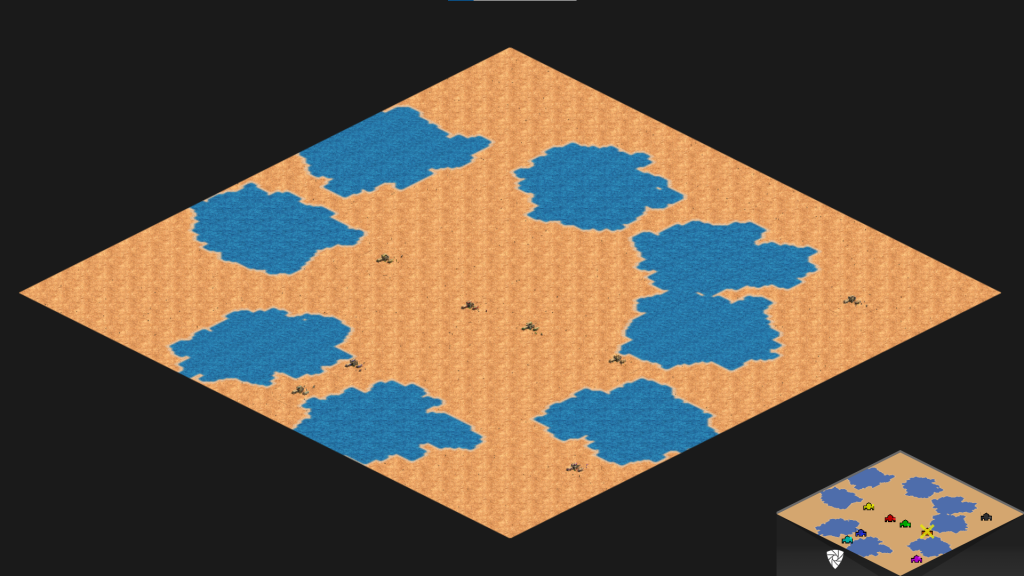
As you may notice, player lands are indeed irregular, roughly circular, and generally avoid one another. They’re also entirely comprised of water, leading to an amusing situation where starting player objects can’t actually be placed on player lands! As a result, the Town Centers, villagers, and scouts (which are all automatically generated on player lands if you forget to do so explicitly) are scattered randomly around the map.
Time for Some Terrain!
Now it’s time to turn those patches of water into something useful. But first, the map sets Color Correction based on the selected season. Think of Color Correction as a filter on your phone camera; AOE2 has options for Desert, Jungle, Autumn, and Winter color correction, allowing lighting to be subtly adjusted when rendering the map if so desired. With that out of the way we then get down to business, starting by converting VODA into DLC_ROCK.
<TERRAIN_GENERATION>
#include_drs F_ColorCorrection.inc

create_terrain DLC_ROCK
{
  base_terrain                   VODA
  land_percent                   100
  number_of_clumps               1000
}
/* Repeat 7x, one for each player land that might be generated */
I’m not particularly sure why this step happens, instead of simply generating DLC_ROCK to begin with. Similarly, I don’t know why both number_of_clumps and land_percent are specified – when I tested, land_percent on its own was sufficient, and simply generating player lands as DLC_ROCK seemed to produce pretty much identical results. But having done so, now we move on to generating a few forests.
/* PRIMARY FOREST */

create_terrain WOODIES
{
  base_terrain                   LAYER_A
  spacing_to_other_terrain_types 6
  land_percent                   7
  number_of_clumps               9
  set_avoid_player_start_areas
  set_scale_by_groups
}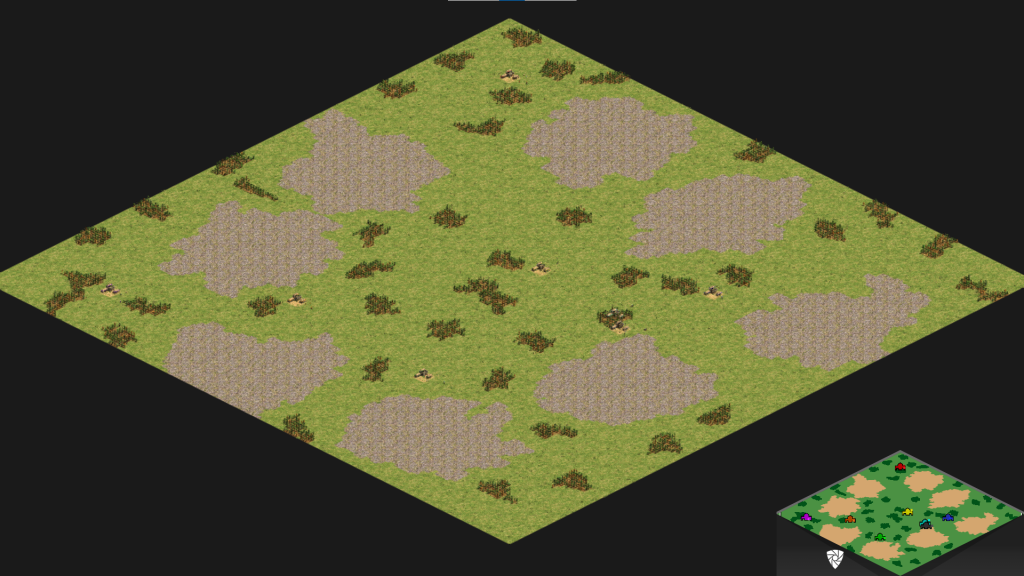
At this point we now have player lands made of some rocky ground as well as a bunch of small scattered forests. Amusingly, our player objects are still generating randomly around the map – as it turns out, DLC_ROCK blocks buildings from being placed on top of it, forcing our poor Town Centers to again randomly scatter across the map. Up next, we add some oases to the map variants that are particularly desert-themed (you might expect that to be the case for all Arabia maps, but as it turns out there’s about a 30% chance of “green” Arabia, as seen in the screenshot above).
if PH_DESERT
   create_terrain VODA
{
  base_terrain                   WOODIES
  spacing_to_other_terrain_types 1
  number_of_tiles		28
  number_of_clumps               3
  set_avoid_player_start_areas
  set_flat_terrain_only
  set_scale_by_groups
}
elseif PH_AFRICAN
   create_terrain VODA
{
  base_terrain                   WOODIES
  spacing_to_other_terrain_types 1
  number_of_tiles		28
  number_of_clumps               3
  set_avoid_player_start_areas
  set_flat_terrain_only
  set_scale_by_groups
}
else
endif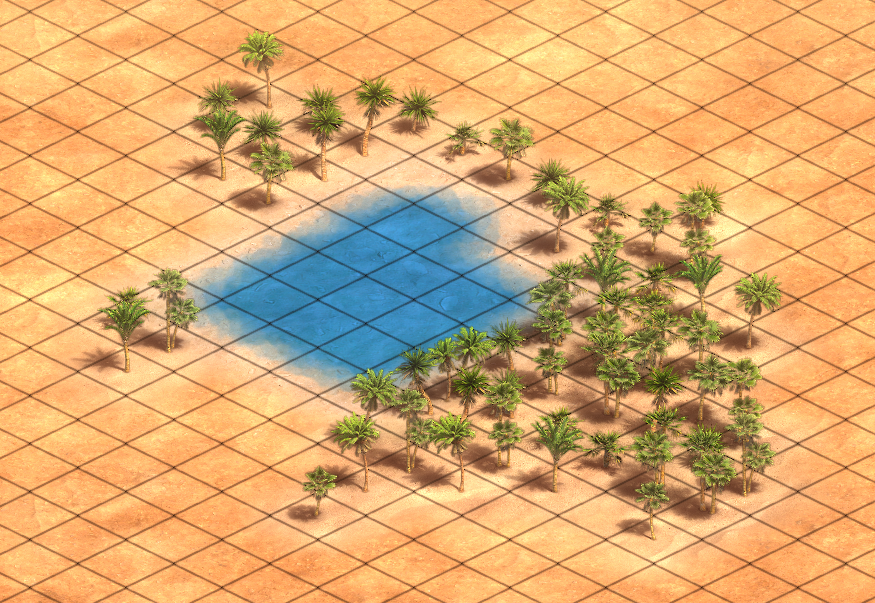
As you’d expect, this converts part of the forests we just created into water, creating small patches of water surrounded by trees – i.e., our oases – scattered across the map. These patches will attempt to avoid player start areas and will stick to flat terrain (we’ll eventually add a few patches of elevation, though as you may recall this actually will occur before terrain generation!). More interestingly, set_scale_by_groups scales the number_of_clumps to the map size, typically resulting in the number of clumps scaling up by 1.4x (tiny maps) – 4.8x (large maps) the specified value (Giant and Ludicrous maps scale this further still, but are generally less commonly played map size). See Zetnus’ guide in the Sources for a detailed breakdown of how this scaling works.
Next, the script continues to add flavor to the map generation by generating several additional small forests with the alternate forest type (WOODIES_B):
/* SECONDARY FOREST */

create_terrain WOODIES_B
{
  base_terrain                   LAYER_A
  spacing_to_other_terrain_types 3
  land_percent                   1
  number_of_clumps               3
  set_avoid_player_start_areas
  set_scale_by_groups
}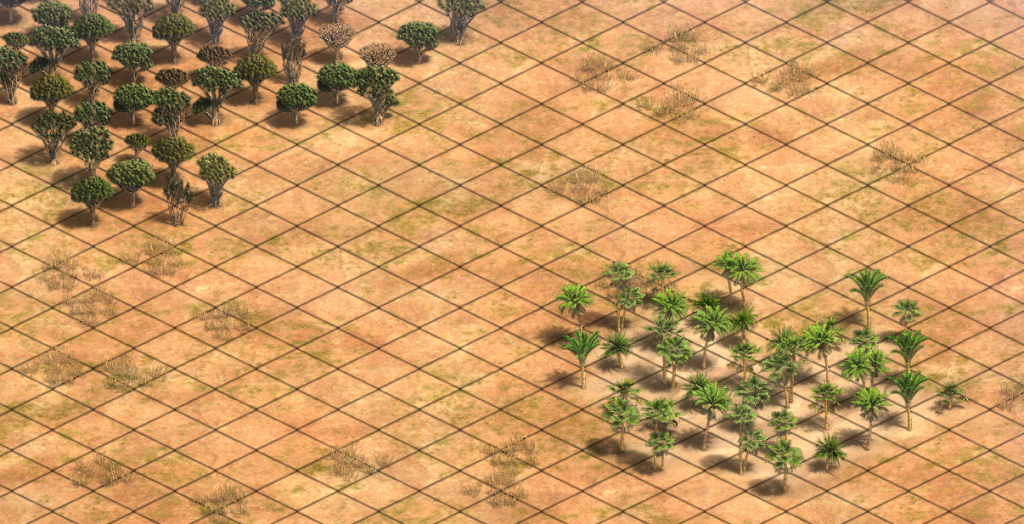
Interestingly, in most cases F_seasons.inc defines both WOODIES and WOODIES_B as aliases for the same terrain type, leading to a rather confusing few minutes while I was finding a suitable screenshot! With that taken care of, the script then turns its attention back to player land generation:
/* Adding individual forests to player lands */

/* 1. pushing forests further away */

  create_terrain LAYER_C
{
  base_terrain                   DLC_ROCK
  land_percent                   100
  number_of_clumps               1000
  spacing_to_other_terrain_types 5
}
/* Repeat 7x, one for each player land that might be generated */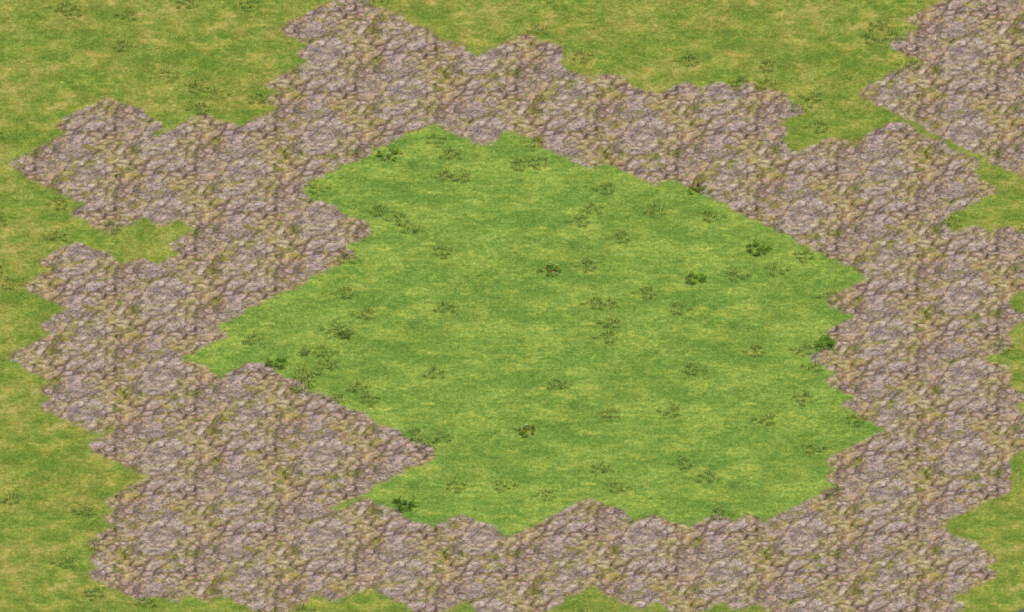
The initial step is fairly straightforward – the inner portion of each player land is converted to a new terrain type. This provides a space in which tree lines can be safely placed without risking overlap with other existing forests, player objects, and other starting resources. Something interesting you may notice in the screenshot – the inner circle of the player lands doesn’t match the surrounding terrain! This is intentional – spacing_to_other_terrain_types only works if you specify a different terrain type from adjacent terrain, which in this case means we can’t use LAYER_A since that’s what fills most of the rest of the map! So, having created our tree-free zone, now we can convert it to LAYER_A so it matches the rest of the map:
  create_terrain LAYER_A
{
  base_terrain                   LAYER_C
  land_percent                   100
  number_of_clumps               1000
}
/* Repeat 12x, one for each player land that might be generated, and a few more for no reason I've been able to discern */
With that taken care of, the next step is to convert the ring of DLC_ROCK terrain surrounding each player’s soon to be base with some distinct terrain, so that we can ensure each player receives exactly the same amount of starting forests:
/* 2. replacing bases with unique terrains */

  create_terrain SNOW
{
  base_terrain                   DLC_ROCK
  land_percent                   100
  number_of_clumps               1
}
  create_terrain DLC_DESERTGRAVEL
{
  base_terrain                   DLC_ROCK
  land_percent                   100
  number_of_clumps               1
}
  create_terrain DIRT2
{
  base_terrain                   DLC_ROCK
  land_percent                   100
  number_of_clumps               1
}
  create_terrain DESERT
{
  base_terrain                   DLC_ROCK
  land_percent                   100
  number_of_clumps               1
}
  create_terrain DLC_JUNGLEGRASS
{
  base_terrain                   DLC_ROCK
  land_percent                   100
  number_of_clumps               1
}
  create_terrain ROAD
{
  base_terrain                   DLC_ROCK
  land_percent                   100
  number_of_clumps               1
}
  create_terrain ROAD2
{
  base_terrain                   DLC_ROCK
  land_percent                   100
  number_of_clumps               1
}
Now we can generate exactly three forests for each player:
/* 3. applying the forests */

  create_terrain WOODIES
{
  base_terrain                   DLC_ROCK
  number_of_tiles		 200
  number_of_clumps               3
  set_avoid_player_start_areas
}
  create_terrain WOODIES
{
  base_terrain                   ROAD
  number_of_tiles		 200
  number_of_clumps               3
  set_avoid_player_start_areas
}
  create_terrain WOODIES
{
  base_terrain                   ROAD2
  number_of_tiles		 200
  number_of_clumps               3
  set_avoid_player_start_areas
}
  create_terrain WOODIES
{
  base_terrain                   DIRT2
  number_of_tiles		 200
  number_of_clumps               3
  set_avoid_player_start_areas
}
  create_terrain WOODIES
{
  base_terrain                   DESERT
  number_of_tiles		 200
  number_of_clumps               3
  set_avoid_player_start_areas
}
  create_terrain WOODIES
{
  base_terrain                   DLC_JUNGLEGRASS
  number_of_tiles		 200
  number_of_clumps               3
  set_avoid_player_start_areas
}
  create_terrain WOODIES
{
  base_terrain                   DLC_DESERTGRAVEL
  number_of_tiles		 200
  number_of_clumps               3
  set_avoid_player_start_areas
}
  create_terrain WOODIES
{
  base_terrain                   SNOW
  number_of_tiles		 200
  number_of_clumps               3
  set_avoid_player_start_areas
}
Having now created our starting forests, the script then spends an amusingly large amount of time (almost 500 lines of code!) cleaning up the temporary terrain used to constrain tree placement. I’ve condensed this below into the basic steps taken; you can assume each of these is repeated 8x:
/* 4. cleaning up (edited for brevity) */
  create_terrain LAYER_A
{
  base_terrain                   DLC_ROCK
  land_percent			 100
  number_of_clumps               1000
}
  create_terrain LAYER_A
{
  base_terrain                   ROAD
  land_percent			 100
  number_of_clumps               1000
}
  create_terrain LAYER_A
{
  base_terrain                   ROAD2
  land_percent			 100
  number_of_clumps               1000
}
  create_terrain LAYER_A
{
  base_terrain                   DIRT2
  land_percent			 100
  number_of_clumps               1000
}
  create_terrain LAYER_A
{
  base_terrain                   DESERT
  land_percent			 100
  number_of_clumps               1000
}
  create_terrain LAYER_A
{
  base_terrain                   DLC_JUNGLEGRASS
  land_percent			 100
  number_of_clumps               1000
}
  create_terrain LAYER_A
{
  base_terrain                   DLC_DESERTGRAVEL
  land_percent			 100
  number_of_clumps               1000
}
  create_terrain LAYER_A
{
  base_terrain                   SNOW
  land_percent			 100
  number_of_clumps               1000
}
Of course, this raises the question of why the map designer didn’t call it a day with the above? As it turns out, there are some edge cases that can occur where not all the temporary terrain will be cleaned up:
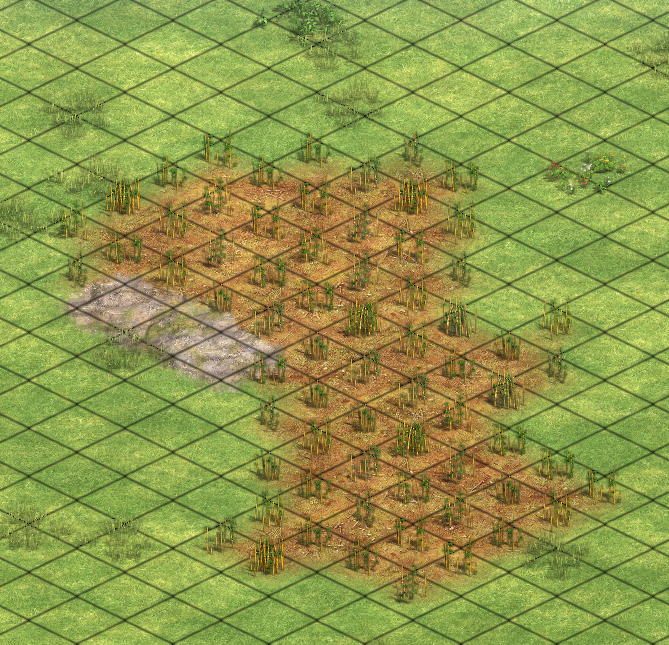
I have a few theories on what may be going on here. My best guess though is that when forests are generated, they can isolate portions of the placeholder terrain. These tiles are either treated as new, separate terrain or else are (by virtue of being isolated from the rest of the parent terrain) missed during terrain conversion. Either way, issuing a few repetitive terrain conversion commands ensures these small patches are cleaned up.
Next, the script adds some variety to the base terrain. This is cosmetic, and mostly focused on making the map look more visually interesting.
/* PRIMARY PATCH */

   create_terrain LAYER_B
{
  base_terrain                   LAYER_A
  number_of_clumps               16
  spacing_to_other_terrain_types 0
  land_percent                   20
  set_scale_by_size
}

   create_terrain DLC_ROCK
{
  base_terrain                   LAYER_B
  number_of_clumps               1000
  spacing_to_other_terrain_types 2
  land_percent                   100
  set_scale_by_size
}

   create_terrain LAYER_A
{
  base_terrain                   LAYER_B
  number_of_clumps               1000
  spacing_to_other_terrain_types 0
  land_percent                   100
  set_scale_by_size
terrain_mask 1
}

   create_terrain LAYER_B
{
  base_terrain                   DLC_ROCK
  number_of_clumps               1000
  spacing_to_other_terrain_types 0
  land_percent                   100
  set_scale_by_size
}

   create_terrain LAYER_B
{
  base_terrain                   DLC_ROCK
  number_of_clumps               1000
  spacing_to_other_terrain_types 0
  land_percent                   100
  set_scale_by_size
}

   create_terrain LAYER_B
{
  base_terrain                   DLC_ROCK
  number_of_clumps               1000
  spacing_to_other_terrain_types 0
  land_percent                   100
  set_scale_by_size
}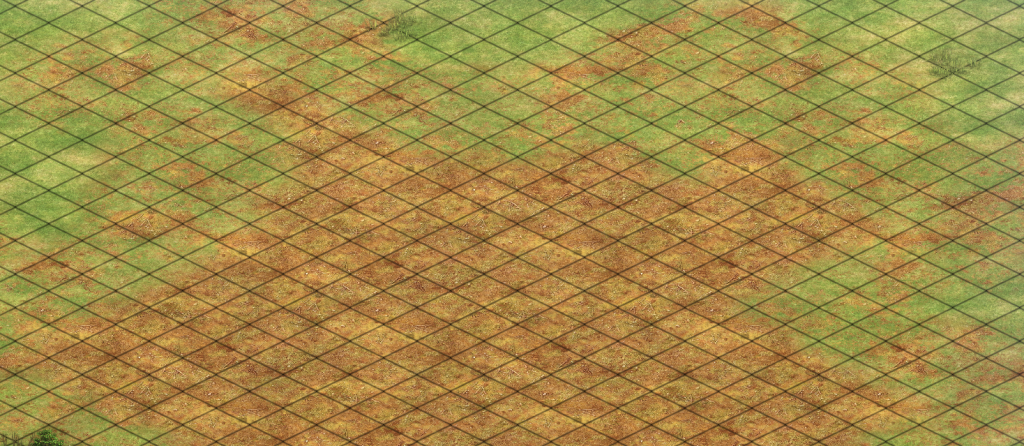
Once again we see the technique of creating a rough circle, carving out a “donut” interior, then manipulating the edges. However, this time there’s a command we haven’t seen before – terrain_mask 1. Terrain masking is a new feature added in Definitive Edition, and is used to blend two terrains together. In this case we’re blending LAYER_A terrain on top of LAYER_B, creating the transition effect demonstrated above. Having done so, the inner area is then converted to LAYER_B (with a few added calls presumably to ensure there aren’t small spots that are missed). Finally, the script wraps up terrain generation with a few (less complicated) areas of terrain masking:
/* SECONDARY PATCH */

   create_terrain LAYER_C
{
  base_terrain                   LAYER_A
  number_of_clumps               24
  spacing_to_other_terrain_types 1
  land_percent                   2
  set_scale_by_size
}

/* TERTIARY PATCH */

   create_terrain LAYER_C
{
  base_terrain                   LAYER_A
  number_of_clumps               30
  spacing_to_other_terrain_types 1
  land_percent                   2
  set_scale_by_size
  terrain_mask 1
}

/* LAYER E+F Patch */

   create_terrain LAYER_E
{
  base_terrain                   LAYER_A
  number_of_clumps               20
  spacing_to_other_terrain_types 0
  land_percent                   2
  set_scale_by_size
terrain_mask 1
}

   create_terrain LAYER_F
{
  base_terrain                   LAYER_A
  number_of_clumps               14
  spacing_to_other_terrain_types 0
  land_percent                   1
  set_scale_by_size
terrain_mask 1
}
Abstract Objects
Object generation in AOE2 is fairly consistent across maps, particularly with regard to starting resources. This is largely for reasons of balance – a map with unusual starting resources plays very differently from a standard map, and may heavily favor certain civilizations. Consequently it should come as no surprise that the AOE2 dev team has abstracted standard object generation scenarios into a single file – GeneratingObjects.inc. Object generation behavior can then be controlled simply by defining appropriate conditionals that define what objects to place in various game-modes (eg, standard, infinite resources, deathmatch, nomad, regicide, etc.). In Arabia, object generation starts with the basics:
<OBJECTS_GENERATION>

#define GNR_NORMALTC
#define GNR_STARTVILLS
#define GNR_CLASSICSCOUT
#define GNR_GIVERELICS

#define GNR_RELICMODERN_MEDIUM
As most AOE2 players would expect, this places starting TCs, villagers, scouts, and relics. We’ve previously discussed most of these, except for relics. GNR_GIVERELICS enables relic placement, and GNR_RELICMODERN_MEDIUM specifies how (and how many) to place relics on the map. Relics provide a small trickle of gold once garrisoned in a monastery, which becomes quite important in longer 1v1 matches once gold on the map runs out. Importantly, relics avoid starting player lands AND other relics, incentivizing players to venture out and establish map control in the mid-game so they can be safely captured for a late game advantage. In the case of Arabia, smaller map sizes spawn 5 relics, medium maps spawn 7, large maps spawn 8, and the aptly named giant and ludicrous sized maps scatter dozens of relics across the map.
Next we move on to regicide setup and starting resources:
#define GNR_REGICIDECLASSIC
#define GNR_6KER
#define GNR_STARTINGGOLD
#define GNR_STARTINGSTONE

#define GNR_SPLITSTARTGOLDS
#define GNR_SPLITSTARTSTONES
#define GNR_HUNTABLE_AVOID_BERRIES

#define GNR_STARTGOLD744CL
#define GNR_STARTSTONE54CL
Regicide classic augments the player’s starting base with 7 additional villagers, a castle, and a king (the latter is quite important, as the game mode’s name implies, as losing the king results in instant defeat. Amusingly, failing to spawn a king in the first place results in automatic defeat for the unfortunate player in question!).
GNR_6KER is a bit more puzzling. KER refers to KERICEK, which is (typically) defined in F_seasons.inc as Forage Bushes (except in Battle Royale, where instead it spawns sheep). I’m assuming KERICEK is named similarly to what we saw earlier with VODA, and presumably translates to something along the lines of berries or forage bushes – if not, I’m a bit puzzled by the rather confusing choice of variable name!
The gold and stone variables are rather more straightforward – they simply enable placing starting gold and stone, with gold being divided into one primary (7 tile) mine and two secondary (4 tile) mines and stone being divided into a primary (5 time) and secondary (4 tile) mine.
Having added our starting gold, stone, and berries, now it’s time to add all the various huntable objects:
#define GNR_GIVEHERD_A
#define GNR_GIVEHERD_B

#define GNR_HERD4CLASSIC_A
#define GNR_HERD22CLASSIC_B

#define GNR_GIVEHUNT

#define GNR_HUNT3OR4CLASSIC

#define GNR_GIVELURES
#define GNR_CLASSICLURES
As you may expect by this point, GNR_GIVEHERD_A and B enable generation of herdable objects (typically sheep, but sometimes cows, llamas, turkeys, etc.) while GNR_HERD4CLASSIC_A and GNR_HERD22CLASSIC_B define placement of these objects (the former creates a cluster of 4 sheep or 3 cows within a few tiles of player’s TCs, while the latter creates 2 pairs of herdables somewhat farther out from the TC). GNR_GIVEHUNT enables placement of deer/zebra/ostrich/etc, while GNR_HUNT3OR4CLASSIC specifies the herd should consist of either 3 or 4 huntables. Finally, GNR_GIVELURES and GNR_CLASSICLURES enables spawning larger huntables that fight back – boars/elephants/rhinos – and ensures each player receives 2 such huntable objects.
#define GNR_DOUBLEPRED
#define GNR_RESBYMAP_KER
#define GNR_FARGORIG_GIVE
#define GNR_FARSORIG_GIVE

#define GNR_FARGORIG_TYPE7
#define GNR_FARSORIG_TYPE7
#define GNR_HOMESTRAGGLE
#define GNR_NORMALBIRDS

#define GNR_SMALLFISHONLY

#define GNR_ADDITIONALPRED

#define GNR_MAPSTRAGGLE
#include_drs GeneratingObjects.inc
Having placed the starting player specific resources, the map then spawns 2 predator objects (eg, wolves) per player (GNR_DOUBLEPRED), a few additional berry bushes scattered around the map (GNR_RESBYMAP_KER), and various neutral gold (GNR_FARGORIG_GIVE, GNR_FARGORIG_TYPE7) and stone (GNR_FARSORIG_GIVE, GNR_FARSORIG_TYPE7) mines around the map. It also spawns 5 straggler trees near each player’s TC (GNR_HOMESTRAGGLE) and a varying amount of straggler trees around the rest of the map (GNR_MAPSTRAGGLE). Finally, the map adds a few birds (GNR_NORMALBIRDS) for flavor, a few extra predators (GNR_ADDITIONALPRED), and fills the oases (if any spawned) with some shore fish (GNR_SMALLFISHONLY). Having defined all the relevant constants, GeneratingObjects.inc is included, triggering generation of the various objects per above.
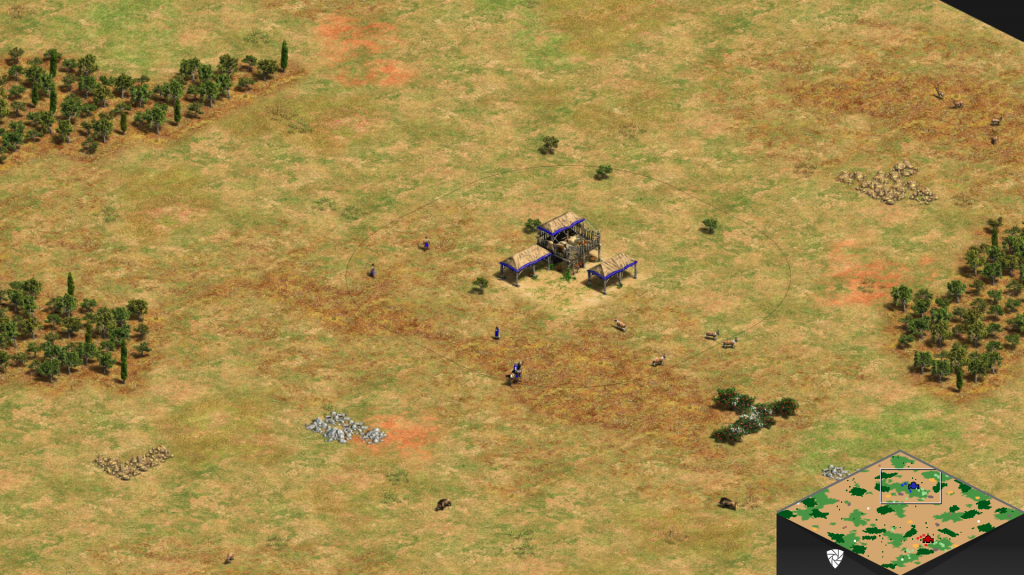
Astute readers may note I didn’t go into much detail regarding how player specific resources are placed. That’s because placing these objects requires a bit of trickery to ensure they spawn in appropriate locations. If you read Part 1, you may recall a brief aside where I mentioned find_closest is unusual for placing items using circular distances instead of square distances. We’ve 3,000 words into Part 2, and it’s officially time to circle back on that.
Find Closest… Wait, not like that!
In Part 1 we noted that “most distance constraints are square distances, with the exception of find_closest, which uses circular distances.” However, there is an additional – very important! – edge case we need to keep in mind, which occurs when using find_closest in conjunction with min_distance_to_players. The former calculates distance from the origin point using a circle; the latter draws a square around the origin point. When you combine the two? You end up with a situation where objects will prefer to be placed on or near the midpoint of each side of the square. Needless to say, this results in a decidedly non-random placement of resources!
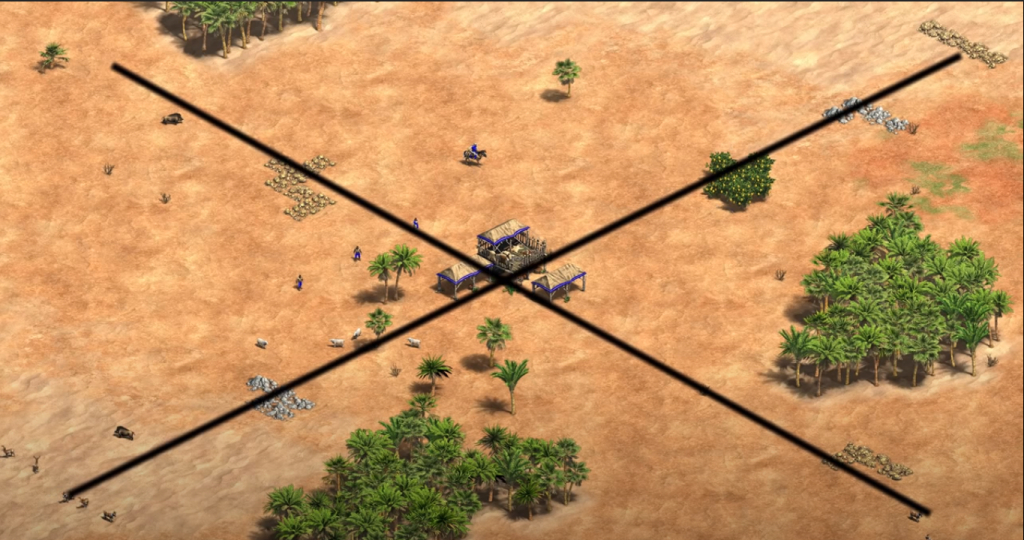
This is a bit of a problem – we need a viable way to place a minimum distance constraint on our resources (so we don’t bury our TC in gold/stone/berries/sheep!) while simultaneously scattering the player resources in a circular area around the TC (so that players can’t simply scout the cardinal directions, knowing that’s where all their resources will be found!). Amusingly, the July 2020 patch saw this issue occur on just about every map (due to the shared usage of GeneratingObject.inc), due to the developers adding find_closest to the constraints on object placement (which previously was constrained simply via min and max distance, which generally worked well but had some well known issues, such as occasionally placing player’s resources – notably, sheep – at the corner of the squares, and thus sometimes requiring one player to do far more scouting than the other to find starting resources).
So given this, how did the devs resolve this issue? Let’s look at a simplified view of how GeneratingObjects.inc places berries on Arabia:
create_object KERICEK
{
  number_of_objects          6
  group_placement_radius     3
  set_tight_grouping
  set_gaia_object_only
  set_place_for_every_player
  min_distance_to_players    10
  max_distance_to_players    25
  find_closest
  avoid_actor_area 6157
  actor_area 14
  actor_area_radius 4	/* originally 6 */
  min_distance_group_placement 2
  avoid_forest_zone 4
  avoid_cliff_zone 2
}
Most of these commands we’ve seen before, or else have a self-evident purpose. But notice the three commands referencing “actor areas”. Actor areas are a way to tag an object (and, optionally, a zone surrounding it) for future reference. The actor area can then be used as a target for additional objects to be placed in (ex, surrounding a mill with several farms, or a herd of deer) or as an area to avoid (ex, to ensure you don’t place your gold right on top of your berries). We see here that “KERICEK” (forage bushes/berries) placement is avoiding actor area 6157. So lets look at what’s going on in that actor area:
create_object BLANKOBJECT
{
  number_of_objects rnd(220,320)
  set_gaia_object_only
  set_place_for_every_player
  find_closest
  min_distance_to_players 9
  actor_area 6157
  actor_area_radius 0
}
So, in this actor area we’ve placed a random (though rather large) number of objects around each player’s TC. As the name suggests, BLANKOBJECT is an alias for an object that don’t actually render in-game – it’s a placeholder simply used to allow the map generation process to create an actor area without dumping a bunch of actual objects onto the map. That’s not particularly helpful for demonstration purposes though, so lets swap in object #639 and see what happens:
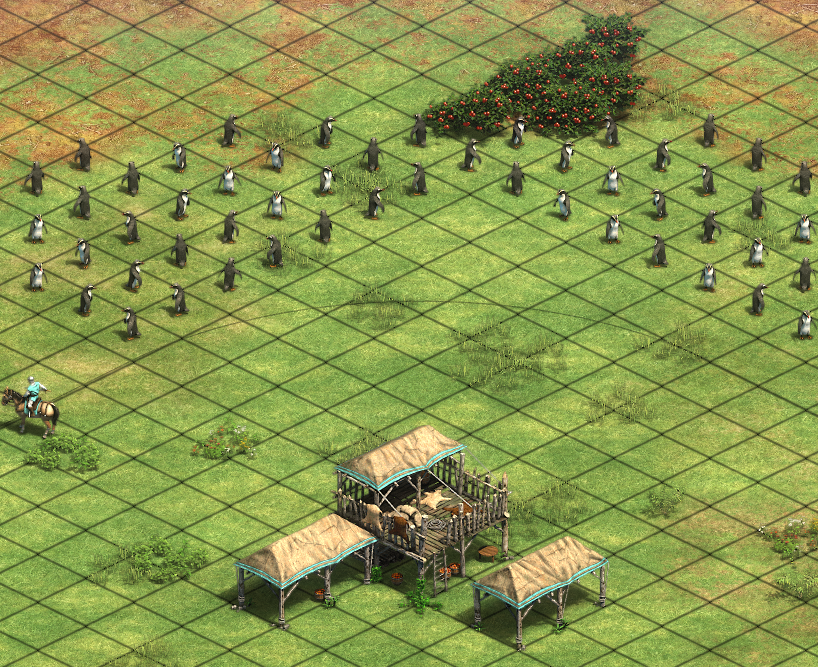
This handily solves our placement issue – the berries avoid tiles with the placeholder objects (as demonstrated by our adorable army of penguins), and since we randomly generate a varying number of placeholders, the closest point along the perimeter of the circle varies randomly. Checking the rest of the code we see that this basic approach is repeated as we place other starting resources – a random number of BLANKOBJECT items are used to draw a circle around the min distance square, then min_distance_to_players is used to force placement on the outside of the circle and find_closest is used to pick a random spot along the perimeter of the circle. The end result is a fair and reliable process for placing starting resources in a circle around the TC within the intended min/max distance.
Elevation and Cliffs
At the tail end of the script we find Elevation and Cliff generation. Although these occur much earlier on (between Land and Terrain generation), the devs seem to prefer placing them at the very end of the file. Elevation generation is largely outsourced to GeneratingElevation.inc:
<ELEVATION_GENERATION>

#const LAYER_D 40

#define GNRELEV_HEIGHT07
#define GNRELEV_INTENSITY_D
#define GNRELEV_LAY_A

#include_drs GeneratingElevation.inc

create_elevation 2
{
  enable_balanced_elevation
  base_terrain LAYER_D
if TINY_MAP
  number_of_clumps 4
elseif SMALL_MAP
  number_of_clumps 6
elseif MEDIUM_MAP
  number_of_clumps 8
elseif LARGE_MAP
  number_of_clumps 12
elseif HUGE_MAP
  number_of_clumps 16
else
  number_of_clumps 16
endif
  number_of_tiles 300
}
To briefly summarize what’s going on here, GNRELEV_HEIGHT07 is specifying a maximum hill height (in this case, hills could in theory be 7 tiles from base to summit), while GNRELEV_INTENSITY_D is setting how many hills and how steep/big they typically are. Finally, GNRELEV_LAY_A restricts placement of elevation to LAYER_A. Having configured how the “standard” hill should be placed, GeneratingElevation.inc is then called, after which a few smaller hills are placed on LAYER_D.
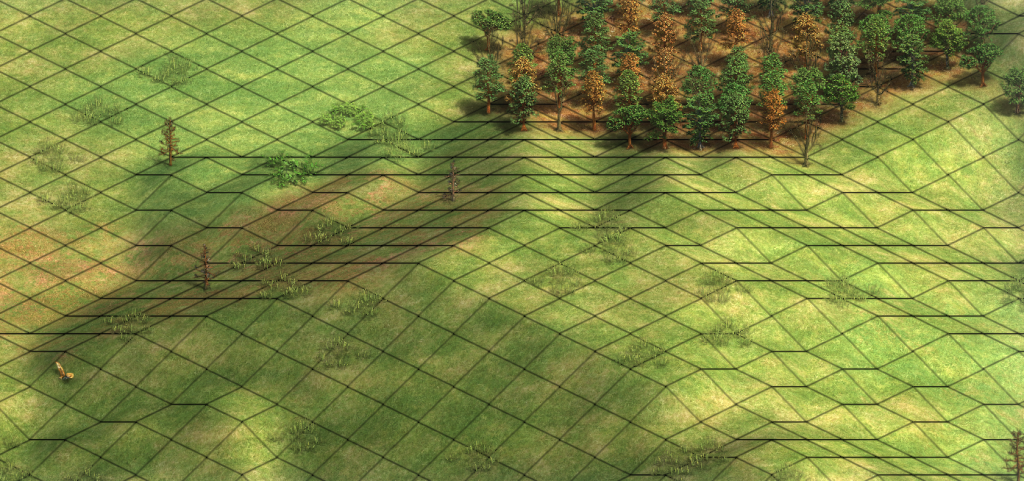
Next, a smattering of cliffs are placed around the map:
<CLIFF_GENERATION>
min_number_of_cliffs 4
max_number_of_cliffs 6
min_length_of_cliff  2
max_length_of_cliff  4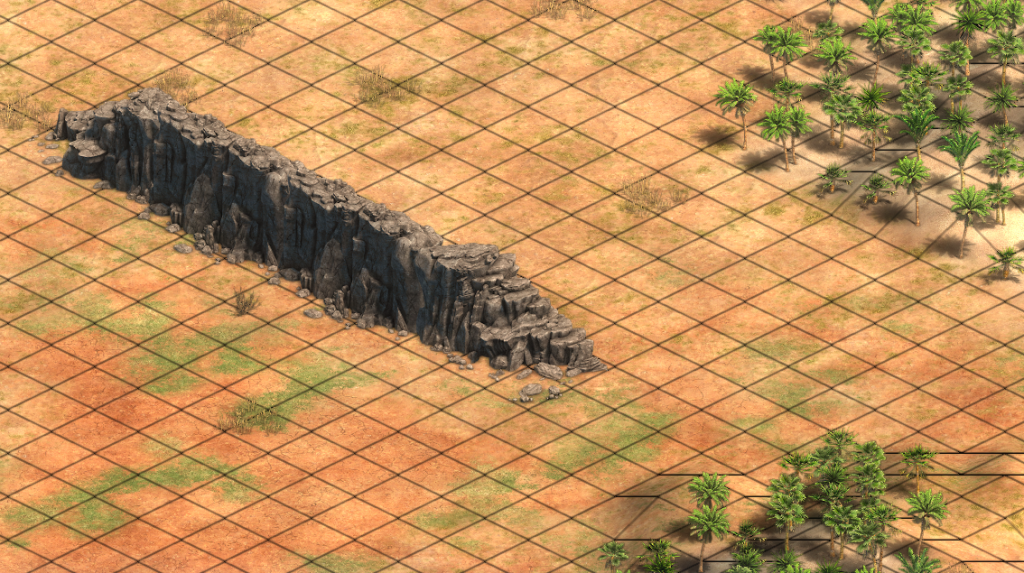
And with that, our breakdown of Arabia is complete! Stay tuned for Part 3, where we’ll look at a few of the more unusual maps in AOE2!
Sources
About The Author

Thomas Harris
Thomas Harris is a full stack developer with a background in web and desktop application development. He enjoys travel, music, reading, playing the violin, and video games. Unfortunately, he is not (currently) a world famous author.